
Roundcube Webmail APK
This Month
Approximately 2.4–2.6 MB
Version 2021.02.21
Android 4+
100K+
Description
Introduction
Managing emails from a smartphone is convenient, especially when you need to communicate with clients, colleagues, or customers while travelling. Roundcube Webmail is an email application that helps Android users access their existing Roundcube webmail accounts without repeatedly opening a browser.
The Roundcube Webmail APK developed by SmallTownBoys was designed to provide a mobile-friendly way to access Roundcube email services. It supports multiple accounts and different email identities, allowing users to manage their communication from one application.
Unlike standalone email services, this application does not create a new email address for you. You need access to an existing Roundcube webmail server and valid login credentials before using it.
In this guide, you will learn about its features, installation process, account configuration, advantages, limitations, and important security considerations.
Roundcube Webmail APK Overview
Before downloading an application, it is useful to understand its basic information and technical requirements.
| App Information | Details |
| Application Name | Roundcube Webmail |
| Developer | SmallTownBoys |
| Package Name | smalltownboys.rc |
| Latest Listed Android Version | 2021.02.21 |
| Category | Communication |
| File Size | Approximately 2.4–2.6 MB |
| Android Requirement | Android 4.0 or higher (listed requirement) |
| Price | Free listing |
| Application Format | APK |
| Main Purpose | Access existing Roundcube email accounts |
Note: These details describe the last listed version of the SmallTownBoys application. Its availability and compatibility with modern Android devices should be checked before installation.
What Is Roundcube Webmail APK?
Roundcube Webmail APK is an Android application designed to provide access to existing Roundcube email accounts through a smartphone.
Roundcube itself is an open-source, browser-based webmail solution that hosting providers and organizations can install on their servers. It allows users to read, send, organize, and manage emails through a web interface.
The SmallTownBoys Android application provides another way to access this service. Instead of manually opening your webmail address in a mobile browser, you can configure your server information inside the application.
One important distinction is that the Android application is a third-party product. The official Roundcube project does not develop or officially support native Android applications.
The application is useful for people who already have Roundcube email access through their hosting provider, workplace, educational institution, or personal email server.
For example, if your hosting company provides an email account through Roundcube, you may be able to configure its webmail address in the application and access your messages from your Android device.
Main Features of Roundcube Webmail APK
The application focuses on making existing Roundcube email services accessible through Android smartphones. Here are its main documented features.
1. Mobile-Friendly Email Interface
One of the main purposes of the application is to provide a more convenient way to access Roundcube on smaller screens.
Traditional desktop webmail interfaces can sometimes be difficult to navigate on smartphones. The SmallTownBoys application was designed to make accessing the Roundcube interface more suitable for handheld devices.
Users can open their configured email accounts and work with their messages through the application.
2. Multiple Email Account Support
Roundcube Webmail supports multiple accounts, according to the developer’s application description.
This feature can be useful if you manage different email addresses for personal and professional communication.
For example, you might have one email account for customer inquiries and another for general communication.
You can configure separate accounts instead of repeatedly entering different server details through a browser.
Each account requires its own correct server address and login information.
3. Multiple Email Identities
Another useful feature is support for multiple identities with different email signatures.
Email identities allow users to communicate using different sender details, depending on their requirements and server configuration.
For instance, a business owner may use a professional signature when communicating with customers and a different identity for general correspondence.
This feature helps organize email communication when several identities are associated with an account.
4. Simple Server Configuration
The application provides dedicated settings for connecting to an existing Roundcube webmail server.
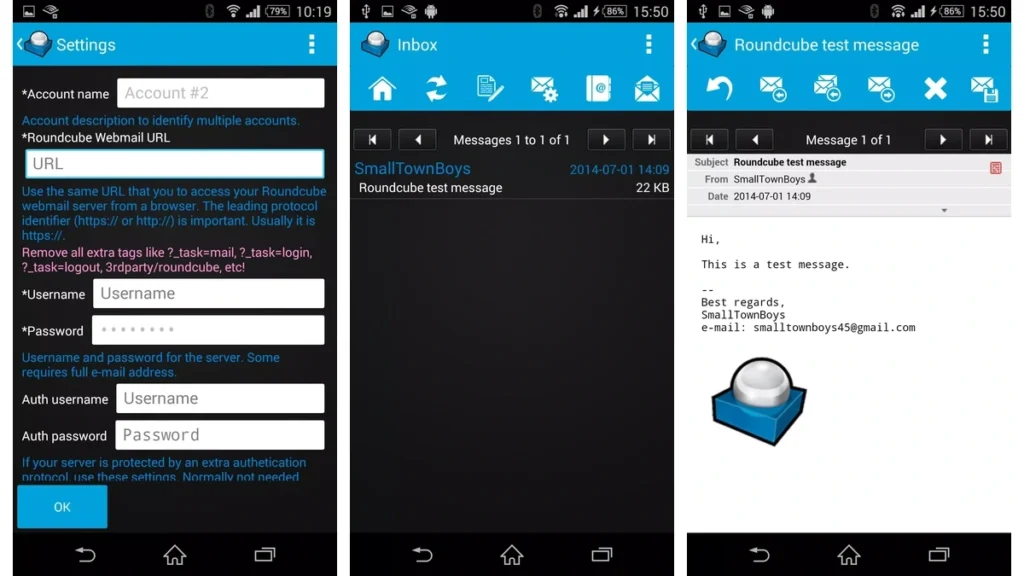
As shown in the application settings, users can enter:
- Account name
- Roundcube Webmail URL
- Username
- Password
- Authentication username
- Authentication password
The server URL is particularly important. You must enter the correct Roundcube webmail address, including its HTTP or HTTPS protocol.
An incorrect address or a webmail interface that does not use Roundcube can prevent the application from connecting.
5. Email Communication
The application is designed to let users access their existing Roundcube email service.
Its purpose includes sending and receiving messages without requiring users to understand the technical configuration of separate POP3, IMAP, and SMTP connections.
However, actual email delivery depends on the configured server and its availability.
6. Email Application Log Reporting
The developer’s description also mentions a Send Application Log option.
This option can help when users encounter technical problems. It allows an application log to be sent for troubleshooting.
Before sharing diagnostic information, review it for personal information, email addresses, server details, or other sensitive data.
Benefits of Using Roundcube Webmail on Android
Using a dedicated application to access an existing webmail account can offer several practical advantages.
Convenient email access: You can open your configured Roundcube account through an Android application instead of manually entering its web address in a browser.
Multiple account management: Support for multiple accounts can help people who manage more than one Roundcube mailbox.
Different email identities: Multiple identities and signatures are useful for separating personal and professional correspondence.
Simplified configuration: The application provides dedicated fields for entering server addresses and account credentials.
Access while travelling: You can access your configured mailbox wherever you have a suitable internet connection and the server is available.
These benefits depend on your email hosting provider, server configuration, and the application’s compatibility with your device.
How to Download Roundcube Webmail APK
If you want to install the SmallTownBoys Roundcube application, first identify a reputable APK distribution source.
Before downloading, check the following details:
- Application name: Confirm that the listing identifies Roundcube Webmail.
- Developer: Check whether the developer is listed as SmallTownBoys.
- Package name: Look for smalltownboys.rc.
- Version: The last listed version is 2021.02.21.
- File information: Review the APK size and available security information.
- Compatibility: Confirm that the file is suitable for your Android device.
Avoid websites offering modified versions, unlocked features, or unexplained updates.
How to Install Roundcube Webmail APK on Android
After obtaining an APK from a source you have assessed, follow these steps to install it.
Step 1: Download the APK
Visit your selected APK distribution website and locate the Roundcube Webmail application. Check its package name and version before downloading. You can also Download from APKPhoenix.com.
Step 2: Open Android Settings
If Android blocks the installation, open your device settings and locate the option for installing unknown applications.
The exact location depends on your Android version and device manufacturer.
Step 3: Allow Installation When Necessary
Give permission only to the browser or file manager you are using to open the downloaded APK.
You do not need to enable unrestricted installation permissions for every application.
Step 4: Open the Downloaded File
Navigate to your Downloads folder and select the Roundcube Webmail APK.
Android will display an installation prompt if the file is compatible.
Step 5: Complete Installation
Review the installation information and proceed only if you trust the source and the requested permissions.
Step 6: Open the Application
After installation, launch Roundcube Webmail and begin configuring your existing email account.
If Android reports that the application is incompatible, do not attempt to bypass system security restrictions.
How to Set Up a Roundcube Email Account
Correct account configuration is essential for connecting the application to your webmail server..
Step 1: Enter an Account Name
Start by entering a name that helps you identify the account.
For example, you can use Business Email, Personal Email, or Work Account.
This description is particularly useful if you configure multiple accounts.
Step 2: Enter the Roundcube Webmail URL
Enter the address of your existing Roundcube webmail server.
For example:
This is an illustrative address, not a working server.
Use the same base URL that you normally enter in your browser to access Roundcube.
The application instructions specifically mention removing additional URL parameters such as login tasks, logout tasks, and unnecessary third-party paths.
Step 3: Enter Your Username
Enter the username provided by your email hosting company or administrator.
Some servers require your complete email address, while others accept a shorter username.
For example:
yourname@example.com
Always follow your provider’s login instructions.
Step 4: Enter Your Password
Enter the password associated with your existing email account.
Make sure the credentials are correct before continuing.
Step 5: Configure Authentication Details
The application also provides separate authentication username and password fields.
These are intended for servers protected by an additional authentication protocol.
According to the application instructions, these fields are normally unnecessary.
If your server requires extra authentication, ask your hosting provider or administrator for the correct details.
Step 6: Save Your Settings
Review all entered information and select the OK button.
If the URL and credentials are correct and the server supports the application, it should be able to connect to your Roundcube interface.
How to Use Roundcube Webmail
Once your account is configured successfully, you can begin accessing your existing email service.
The second supplied screenshot shows an example of the application’s message-viewing interface.
Reading Received Emails
Open your mailbox and select a message to view its contents.
The message screen displays information such as the subject, sender, date, and email body.
This allows you to review incoming communication from your configured email account.
Sending and Replying to Emails
The application interface includes email-related controls for responding to messages and managing outgoing communication.
You can use the available message actions according to the configured Roundcube server’s capabilities.
Always check the recipient’s address and message content before sending an email.
Managing Multiple Accounts
If you have configured multiple accounts, use the account selection options to access the mailbox you need.
This can help separate communication between different email addresses.
Managing Email Identities
If your account supports multiple identities, you can use different sender information and signatures for different communication purposes.
The available identity options depend on your Roundcube server configuration.
Pros and Cons of Roundcube Webmail APK
Every application has advantages and limitations. Understanding both can help you decide whether this older Android client is appropriate for your requirements.
| Pros | Cons |
| Dedicated access to Roundcube webmail | Last listed release dates back to 2021 |
| Supports multiple accounts | No longer available on Google Play |
| Supports multiple email identities | Requires an existing Roundcube server |
| Different email signatures | Third-party application without official Roundcube support |
| Dedicated server configuration | Compatibility with modern Android versions needs checking |
| Application log reporting | Depends on the configured server |
The application may be convenient for compatible existing accounts, but its age and third-party status deserve careful consideration.
Safety, Privacy, and Compatibility
Before installing Roundcube Webmail APK, understand the difference between the official Roundcube software and the SmallTownBoys Android application.
The official Roundcube project provides open-source webmail software. Its support documentation states that the project does not provide or recommend native mobile applications.
Therefore, you should not assume that the SmallTownBoys application is officially affiliated with the Roundcube development team.
Here are some precautions to follow:
- Download APK files only from reputable distribution sources.
- Check the package name and application version.
- Scan the downloaded file using an appropriate security solution.
- Review the requested Android permissions.
- Avoid modified or repackaged application files.
- Use a strong and unique email password.
- Prefer HTTPS connections when accessing your webmail server.
- Never share your email credentials with unknown websites or individuals.
The last listed Android requirement is Android 4.0 or higher. However, this historical minimum does not guarantee that the application will work properly on every modern Android device.
For users concerned about long-term security and compatibility, accessing Roundcube through an updated mobile browser is an alternative worth considering.
Common Roundcube Webmail Problems and Solutions
Sometimes users experience connection or configuration problems when setting up an email application.
Here are some common issues and possible solutions.
1. Incorrect Webmail URL
An incorrect server address is a common configuration problem.
Check the URL you normally use to open Roundcube through your browser. Make sure it includes the correct protocol and server path.
Remove unnecessary login or logout parameters.
2. Invalid Username or Password
If your account cannot connect, verify your login information.
Some hosting providers require a complete email address instead of a shortened username.
If your password has changed, update the saved credentials.
3. Connection Problems
Your email server may be temporarily unavailable, or your internet connection may be unstable.
Try opening the same webmail address in your mobile browser.
If it also fails there, contact your hosting provider.
4. Unsupported Webmail Interface
This application is designed specifically for Roundcube.
It may not work with other webmail platforms, even if their interfaces look similar.
Check whether your provider actually uses Roundcube before configuring the application.
5. Application Compatibility Problems
Because the last listed version dates back to February 2021, some modern Android devices may experience compatibility issues.
Check the application source, device compatibility, and available updates before attempting another installation.
If the application does not work reliably, use your provider’s recommended email access method instead.
Frequently Asked Questions
The SmallTownBoys Android application was listed as a free application. However, accessing Roundcube depends on having an existing email account through a hosting provider or administrator.
The Android application discussed in this guide was developed by SmallTownBoys. It is a third-party application and is not officially supported by the Roundcube project.
Yes. The developer’s application description lists support for multiple accounts and multiple identities with different email signatures.
No. The SmallTownBoys application requires a compatible Roundcube webmail interface. It is not designed to connect to every email platform.
According to AppBrain’s application history, the SmallTownBoys application was removed from Google Play on May 15, 2023. Its availability through third-party distribution websites may vary.
Conclusion
Roundcube Webmail APK by SmallTownBoys was designed to make existing Roundcube email accounts accessible through Android smartphones. Its documented features include multiple account support, different email identities, and dedicated server configuration.
However, its last listed version is from 2021, and it is no longer available on Google Play. It is also important to understand that the official Roundcube project does not endorse or support this native Android application.
Before installing it, check the APK source, compatibility, and security information. If you need a reliable way to access your email, your hosting provider’s recommended webmail interface or an updated mobile email client may be a better long-term option.
Download links
How to install Roundcube Webmail APK APK?
1. Tap the downloaded Roundcube Webmail APK APK file.
2. Touch install.
3. Follow the steps on the screen.